
Elementor Ally is the accessibility tool most Elementor users have never installed. It’s a free plugin from the Elementor team, separate from Elementor itself, and it’s easy to miss if nobody’s pointed you to it. If you’ve never thought about website accessibility beyond a vague sense that it matters, Ally is worth twenty minutes of your time. Accessibility lawsuits against small and mid-sized business websites have been climbing for years. Ally is the closest thing Elementor’s ecosystem offers to an automated defense against the most common issues that trigger them.
What Elementor Ally Actually Does
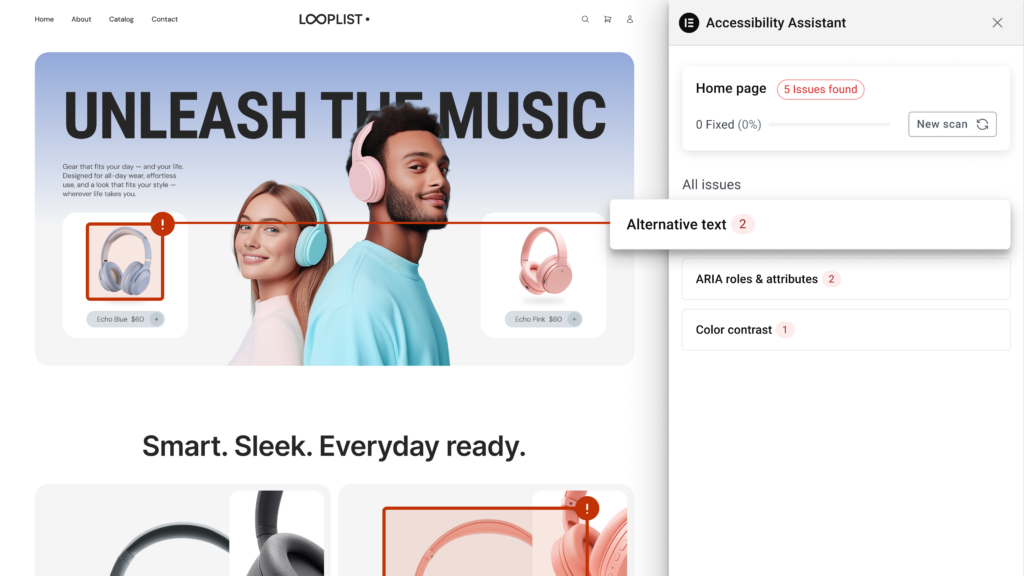
Ally, officially named Web Accessibility, is a free plugin published by the Elementor team, installed separately from Elementor’s core editor and Pro plugin. Once activated, it checks your pages against WCAG, the Web Content Accessibility Guidelines that most legal accessibility standards are based on. You can run a scan from a dedicated Ally dashboard in WP Admin, or trigger one directly from a page’s edit screen. It flags issues like missing alt text on images, insufficient color contrast between text and its background, improper heading structure, and missing form labels.
What sets Ally apart from a generic accessibility plugin is that it doesn’t just flag problems. For a meaningful share of common issues, it offers an automated fix you can apply directly from its own panel. You never need to manually rewrite HTML attributes yourself. That single feature removes most of the friction that normally keeps accessibility work from happening at all.
Why This Matters More Than It Might Seem
Website accessibility tends to sit in the same mental category as backing up your site. Everyone agrees it matters, and almost no one gets around to it until something forces the issue. For accessibility specifically, that forcing event is often a demand letter or a lawsuit. The number of website accessibility lawsuits filed against small and mid-sized businesses in the US has grown substantially over the past several years, well beyond just large enterprise sites.
The uncomfortable reality is that most business owners have no idea their site has accessibility issues until they’re told. The site looks and works fine to someone without a visual or motor impairment. A screen reader user encountering an image with no alt text experiences a genuinely broken page, even though it renders perfectly for most visitors. The same goes for someone with low vision struggling to read light gray text on a white background.
Running Your First Elementor Ally Scan
Once installed, Ally gets its own menu item in WP Admin, alongside a dedicated dashboard where you can scan pages one at a time rather than your entire site at once. You’ll want to run it page by page, starting with your highest-traffic pages. Begin with your homepage, main service or product pages, and your contact page. Open the page from Pages or Posts, click Resolve Issues or New Scan, and the Accessibility Assistant panel opens alongside the page with its results.
You’ll typically see issues grouped by severity. The most impactful problems get flagged first, things like missing alt text on meaningful images or genuinely unreadable color contrast. Work through them in that order, rather than trying to fix everything on the page simultaneously.
What Ally Catches Automatically
Alt text is the most common issue Ally flags, and usually the easiest to fix. Every image that conveys meaning, rather than being purely decorative, needs alt text describing what it shows. Ally identifies images missing this attribute. For many of them, it can suggest reasonable alt text automatically, which you can accept or edit before applying.
Color contrast is the second most common flag. WCAG sets minimum contrast ratios between text and its background. Light gray text on white backgrounds, a design choice a lot of modern sites lean on for a minimal aesthetic, frequently fails this check. Ally identifies the specific elements involved and can suggest a compliant contrast adjustment.
Heading structure is a more subtle issue Ally also checks. Pages should use headings in logical order: an H1 followed by H2s, followed by H3s where needed. Skipping levels or using heading tags purely for their visual size, rather than their semantic meaning, causes real problems. Screen readers use heading structure to let users navigate a page efficiently. A page with headings out of order is genuinely harder to navigate for someone relying on that structure.
What Elementor Ally Doesn’t Catch
It’s worth being realistic about Ally’s limits. Automated accessibility scanners, Ally included, catch a meaningful share of common issues but not everything WCAG covers. Some things require manual testing that no automated tool fully replicates. Whether your interactive elements are fully operable by keyboard alone is one example. Whether your video content has accurate captions is another. Whether complex interactive widgets announce their state correctly to screen readers is a third.
Treat Ally as a strong first pass that removes the most common, easiest-to-fix issues, not a complete accessibility audit. For sites with strict compliance requirements, pairing Ally with a manual review or a dedicated accessibility auditing service is still worth the investment. This matters especially for larger businesses or anything serving government contracts.
Building New Pages With Accessibility in Mind From the Start
Running Ally after a page is finished works, but it’s more efficient to build with a few habits in mind from the beginning. Add alt text to images as you upload them, rather than leaving it for later. Choose your color palette with contrast in mind before you commit to Global Colors across the whole site. Fixing a site-wide color choice after the fact touches every page that uses it. Use Elementor’s heading widgets in proper logical order, rather than picking a heading tag purely because of how large it renders by default.
These habits cost almost nothing extra during the build phase. They save significant cleanup time later, particularly on larger sites where retrofitting dozens of pages is far more work than building them correctly the first time.
Accessibility and SEO Overlap More Than You’d Expect
A lot of what Ally checks also happens to be good SEO practice, which isn’t a coincidence. Descriptive alt text helps search engines understand what an image shows, the same way it helps a screen reader user. Logical heading structure helps search engines parse your page’s content hierarchy the same way. Fixing accessibility issues with Ally is, in a real sense, also a technical SEO cleanup pass. That makes it easier to justify the time even for site owners who aren’t primarily motivated by compliance concerns. For more on the technical side of that overlap, see our guide to Elementor’s SEO capabilities.
Do You Need Elementor Pro to Use Ally?
No. Ally installs as its own free plugin, independent of whether you’re running Elementor’s free version or Elementor Pro. Its core scanning and manual-fix suggestions are free to use once installed. The paid tier sits on top of Ally itself, not on top of Elementor: features like AI-generated fixes and a larger monthly scan quota require a separate Ally subscription. Check Elementor’s own Ally product page for its current free and paid limits.
Frequently Asked Questions
Does using Elementor Ally make my site legally compliant with the ADA?
No single tool guarantees full legal compliance, and Ally is no exception. It significantly reduces common, easy-to-fix issues, which lowers real-world risk. Full ADA compliance typically requires broader testing beyond what any automated scanner covers.
How long does it take to fix accessibility issues on an existing site?
It depends heavily on site size and how many issues Ally finds. A small business site with a handful of pages might take a few focused hours. A larger site with dozens of pages and heavy image use can take considerably longer, particularly for the alt text review, which usually benefits from a human check even after Ally’s automated suggestions.
Can Ally check my entire site at once, or only one page at a time?
Ally scans one page at a time, whichever page or post you select from its dashboard or the page list. For a full-site audit, you’ll need to open and scan each page individually rather than running one site-wide scan.
Is accessibility only a concern for large businesses?
No. Lawsuits and demand letters have increasingly targeted small and mid-sized business websites in recent years, not just large enterprises. That’s part of why a free, low-effort plugin like Ally has become genuinely useful for smaller site owners.

Mēs esam web izstrādes komanda, kas ikdienā strādā ar WordPress, WooCommerce, Elementor un vairāki desmitiem klientu vietņu — no restorāniem un viesnīcām līdz medicīnas iestādēm un ražošanas uzņēmumiem. toelementor.com izauga tieši no reālas nepieciešamības: klienti bieži vēlas pāriet no vecākiem page builderiem (WPBakery, Divi, Beaver Builder) vai citām platformām (Wix, Squarespace, Webflow) uz Elementor, nezaudējot dizainu, saturu vai Google pozīcijas.
Mūsu specializācija ir tehniskā SEO audita apvienošana ar praktisku migrācijas darbu — katru migrāciju pavada URL saglabāšana, 301 redirect kartēšana un pēc-migrācijas veiktspējas pārbaude, ne tikai vizuāla pārbūve.